ClassicConnect ClassicConnect
"640k ought to be enough for everybody."
 
FAQ :: Search :: Memberlist :: Usergroups :: Register
Profile :: Log in to check your private messages :: Log in

Compatibility Mode in Windows 2000

 
Post new topic   Reply to topic    ClassicConnect Forum Index -> Software and Web Design
View previous topic :: View next topic  
Author Message
nick99nack
Admin


Joined: 30 Aug 2023
Age: 30
Posts: 171
Location: NJ, USA

PostPosted: Sun Feb 02, 2025 5:33 am    Post subject: Compatibility Mode in Windows 2000 Reply with quote

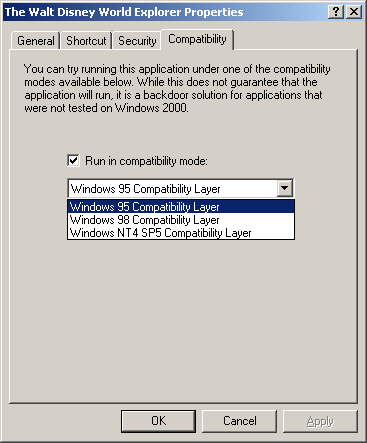
Many people don't know this, but Windows 2000 also had the compatibility mode feature that was in Windows XP, but it wasn't enabled by default.

To enable it, run the following command:
Code:
regsvr32 %windir%\apppatch\slayerui.dll


This will give you a compatibility tab on shortcuts like this:


_________________
If you like browsing without an ad blocker, you might also like getting rid of your virus scanner, and running around with your pants down. --SomeGuy, 2016
Back to top
View user's profile Send private message Visit poster's website AIM Address MSN Messenger
Bryn
Member


Joined: 01 Dec 2024
Posts: 16
Location: Glasgow, Scotland, UK

PostPosted: Tue Feb 04, 2025 4:54 pm    Post subject: Reply with quote

Nice one... thanks for sharing! Very Happy

I wonder why it was disabled by default though? Confused
Back to top
View user's profile Send private message
Display posts from previous:   
Post new topic   Reply to topic    ClassicConnect Forum Index -> Software and Web Design All times are GMT
Page 1 of 1

 
Jump to:  
You cannot post new topics in this forum
You cannot reply to topics in this forum
You cannot edit your posts in this forum
You cannot delete your posts in this forum
You cannot vote in polls in this forum


smartDark Style by Smartor
Powered by phpBB 2.0.25 CC Mod © 2001, 2002 phpBB Group
 
Page generation time: 0.0136s (PHP: 93% - SQL: 7%) - SQL queries: 11 - GZIP enabled - Debug on