|
ClassicConnect
"640k ought to be enough for everybody."
|
| View previous topic :: View next topic |
| Author |
Message |
VCSMaster
Disk Central Admin

Joined: 25 May 2025
Posts: 221
Location: Southeastern USA
|
 Posted: Sun Nov 16, 2025 6:37 am Post subject: Royal LetterMaster: Back from the dead Posted: Sun Nov 16, 2025 6:37 am Post subject: Royal LetterMaster: Back from the dead |
 |
|
Hello all, tonight I bring to you an unusual project of mine that sat on the backburner for way too long: the TA-Royal LetterMaster computer printer.
A brief introduction to the TA-Royal LetterMaster
At the time of it's introduction, this was THE cheapest "letter quality" computer on the market, and it absolutely shows. The LetterMaster is literally built from the shell of the Alpha 100 typewriter, including most of the same case design and the same STUPID inking system involving a foam roller soaked in ink mounted to a plastic tab. The print wheel rotates past the ink roller and vaguely picks up a little bit of ink as it prints. It's incredibly wasteful and the rollers dry out rapidly because they are just exposed in the air. I'm sure people got messy fingers changing them and print wheels, too.
The LetterMaster is a really, really slow daisy wheel printer, which sounds like a typewriter in operation (because it is!) with it's breathtaking pace of 8 whole characters per second (Under optimal conditions). To put that into perspective, my Oki ML186 can print at well over 100 characters per second in the same effective quality!
Some history about the Diablo 630
Like many daisy wheel printers, the Royal LetterMaster emulates the venerable Diablo 630 daisy wheel teletype of the 1960s and 1970s. It was a very popular mechanism, lots of direct clones came out, and when we moved into the 80s, it was fairly logical to keep software compatibility.
There is really not a lot to Diablo 630 emulation, but you wouldn't know that because almost nobody has bothered to write down or even remember half of this crap! I had to find a paper copy of the Royal LetterMaster manual to find the escape codes and only found out days later that it was Diablo 630 compatible by complete accident - a listing on eBay for an original Royal brochure appeared with the words written in pen on one of the pages - "DIABLO 630 IMULATION," misspelling and all.
Well great, now that I know this isn't some wacky bespoke Royal control set, I should be able to just go dig up a Diablo 630 driver and run it with that, right? <Extremely loud incorrect buzzer noise> WRONG! Nobody has made any software that supports the Diablo 630 that I could find since the mid 1980s when this printer was still on shelves! It was dying by 1984 and absolutely flat out gone by 1990.
This presents a problem: So how are we going to use it? Of course, I can just hit test print all day, but that's not nearly as fun as generating your own originals!
Comprehending the Windows printer driver model
Well, Microsoft to this day provides a "Generic / Text Only" driver with Windows, so that's something. It will spit out text this way, but according to the manual this thing (like the Diablo 630 and it's cousins) can do some basic formatting! The manual is even so kind as to give escape codes and example BASIC programs for making the printer do interesting things, this should be easy!
And so, on that spring day back in 2020, I began my quest to actually get this thing running. Unfortunately, at the time, I hit the absolute brick wall that is Microsoft, which will surprise almost nobody. The "Generic / Text Only" driver is actually just an INF loaded by the UNIDRV print driver engine, which is a fantastic innovation, but basically unparseable by any normal, sane human being. It has provisions for everything from serial terminals to pen plotters to microfiche lithography to phototypesetting to inkjet. Making sense of literally any of the documentation takes the kind of expert I am not, or at least patience and free time I have never had.
I found out shortly that in the 9x days, Microsoft offered the option of setting custom control codes for some select "advanced printing" functionality via the use of the Generic / Text Only driver and was intrigued, so I dug out a machine running Windows Me, and sure enough, the generic driver includes an "Advanced" configuration tab which allows you to set a few control codes. A solid attempt at this yielded absolutely nothing of worth. Entering anything in any field would just outright corrupt anything being printed - the printer began starting text in the middle of the line, printing backwards, doublestriking characters that should not be double struck, and other very unusual behaviors. At the time, I chalked this up to Windows Me being wacky, but the same occurs in 95 and 98SE. Going to NT, Microsoft drops the "Advanced" tab after NT4, presumably because they figured nobody would be running a 30 year old teletype as a printer on their brand new from the ground up workstation operating system. A pretty reasonable assumption, honestly. I was able to dig up the specific files from NT4 and port them forward to XP, but the behavior persists between all of them. I am still not sure why this was happening.
It was at this point I began to entertain the idea of just outright paying someone to MAKE ME a driver. I have lots of wacky printers I would love to make use of, so paying some kind developer a few hundred dollars to suffer and make me a more stable, configurable driver seems like a reasonable expense on my part, then just dump it on my website for free and pray it never makes it onto a corporate network and crashes a $4bn company with bad memory safety.
The solution (for now)
Well, since then, over 4 years have passed, and I have not yet found a single person willing to take the commission to write me a driver, or even just a UNIDRV INF file, for any price. I once offered someone $2000 up front for this and still no dice.
It was at that point when, tonight, being in a manic episode as I am on occasion when I have a really good day, I sat down with a copy of the manual and decided to check if these control codes even worked at all for this printer.
And to cut the story short a bit, they do!
I wrote a short script in my favorite utility programming language in the world, Microsoft Batch, to just spit control codes out the parallel port blindly and watch the behavior of the printer as I did so. With the manual and a little bit of trial an error, I was able to get the printer to demonstrate every special feature documented in the manual reliably!
Those features are as follows:
-Bold text (by doublestriking every character)
-Underlined text (by doublestriking every character with an underscore)
-Bold AND underlined text (by triple striking every character, the third strike being an underscore)
-Vertical offset (by performing half of a line feed)
-Automatic Cent symbol generation (by doublestriking lowercase c with a forwardslash)
-User controlled multistrike (by respecting the backspace character)
What a dazzling list of incredible features, no?
The conclusion
Well, I doubt anyone here has one of these things, but a Diablo 630 compatible printer is not as uncommon as you might think. Typically, I find they are RS-232 serial, but there are at least a couple centronics parallel models out there, like this Royal, my Teletex TTX1014 compact daisy wheel, the Juki 6100 (which I really want to own), etc. Because Batch is pretty flexible, changing the port is not too hard. If you add a MODE statement and change the variable "PORT" at the top of the program, you can set your baud rate, data and stop bits, flow control, etc, and pick any port you want. I should mention that I'm not sure if USB to Parallel adapters actually work, because I have not tried it. I know there are some issues with serial, but I leave that as an exercise for the reader.
Here is the program in it's current form: http://aioinc.ddns.net/HOST/files/utils/lettermaster.bat
And some sample output from the printer (this is a cropped section of a scanned page, I had to absolutely crank the contrast through the roof to make it even this legible, I'm serious when I say that the ink roller design absolutely blows)
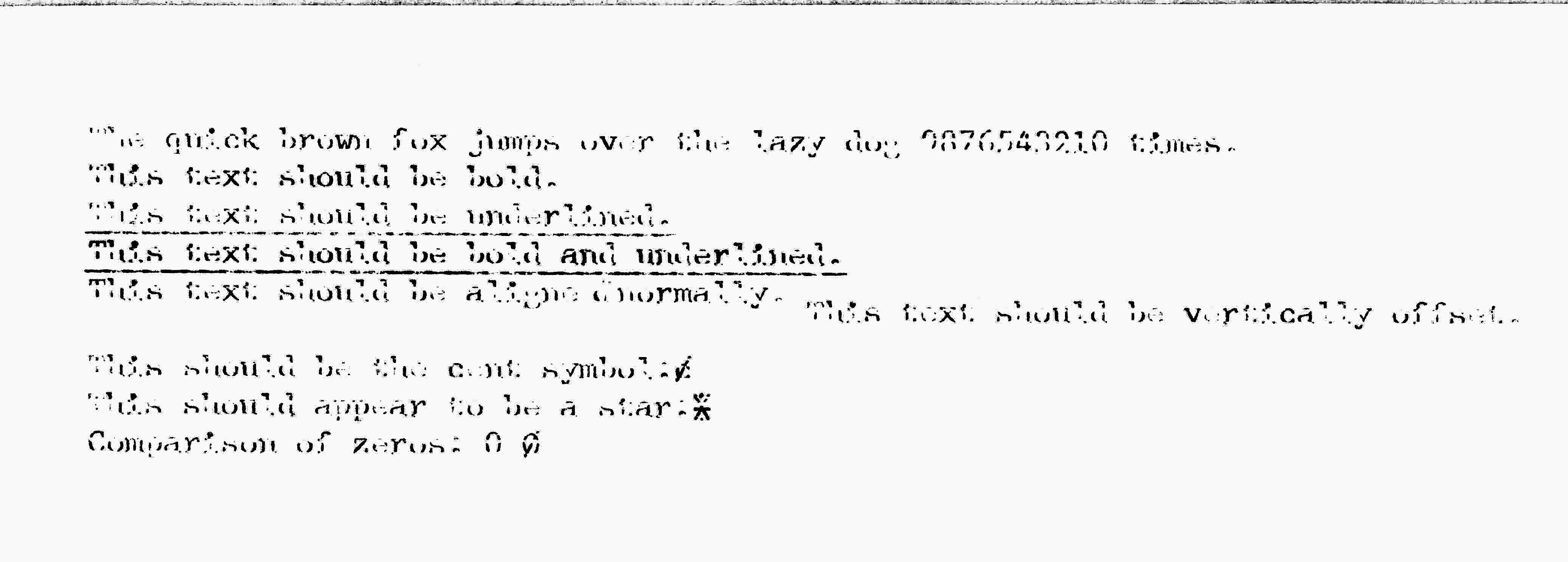
Hope this held someone's interest. Comments, questions, criticism are all welcome and encouraged. I think my next step will be trying to make the Tandy DWP210 (non-Diablo compatible daisy wheel) work in the same way, followed maybe by the Okimate 10/20 (color thermal printers from the 80s in the same driver situation). |
|
| Back to top |
|
 |
VCSMaster
Disk Central Admin
Joined: 25 May 2025
Posts: 221
Location: Southeastern USA
|
| Posted: Sun Nov 16, 2025 8:15 am Post subject: |
|
|
Just an update: I took a quick look at the Tandy DWP-210's manual, and it appears that it uses not only a completely bespoke command set, but a really annoying one, too. To do any effects other than underlining, you basically have to do everything manually. "Convenient!"
I threw something together quick to drive it. For some reason, this prints really, really slowly, even though this printer is actually much faster than the LetterMaster.
For the curious, the program is http://aioinc.ddns.net/HOST/files/utils/dwp210.bat here.
Here is the sample output scanned in. This one uses a carbon transfer ribbon which is starting to fade but has not yet gone completely, no contrast adjustment was necessary. The bold characters look strange, I could probably adjust it to look better, but I'm not going to, because I'm not really interested in driving this thing off a PC anyways, especially knowing now that it basically can't do anything on it's own.
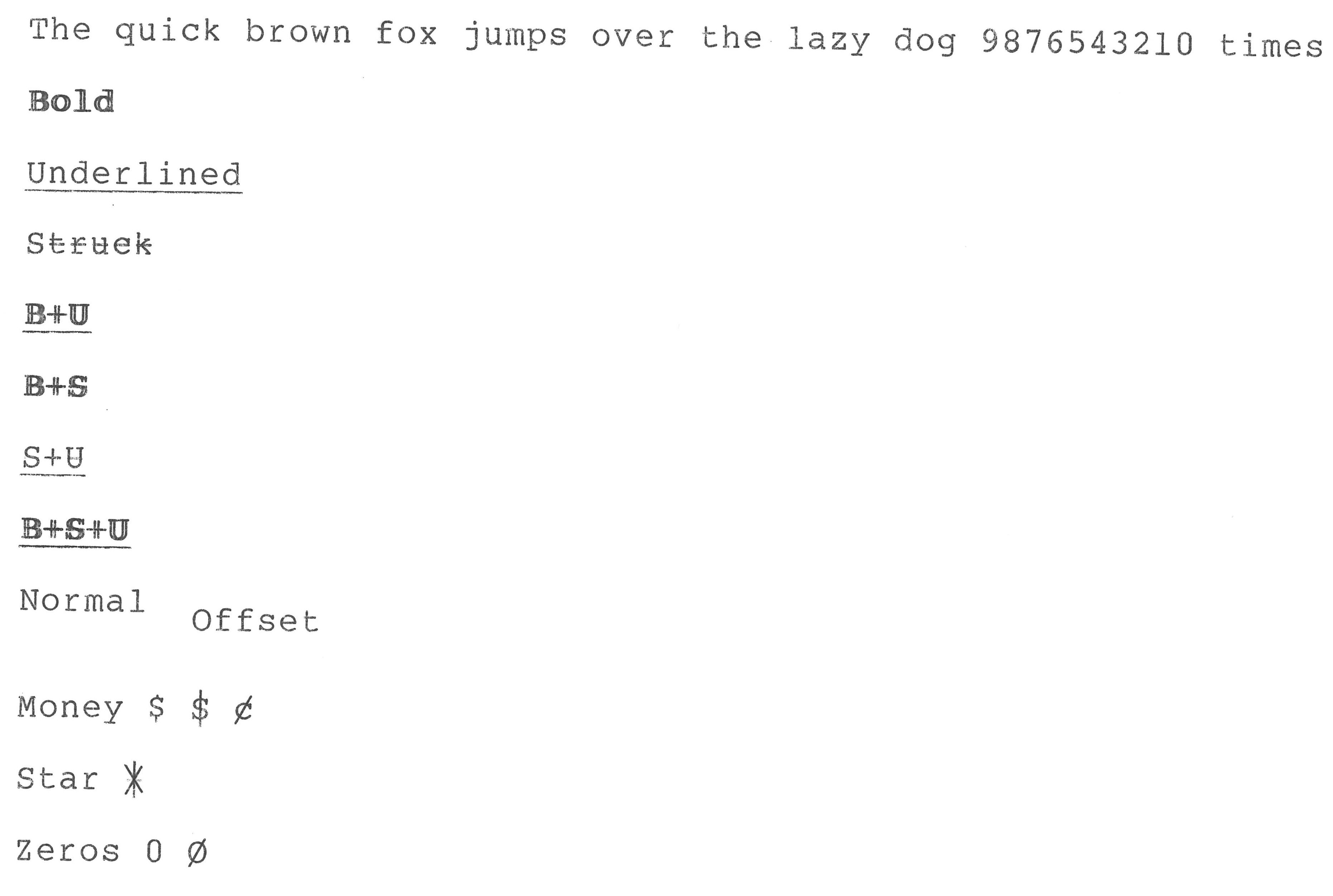
Enjoy. Depending on how I'm feeling tomorrow, perhaps I will start reading the manual for the Okimate 20 I have. |
|
| Back to top |
|
|
VCSMaster
Disk Central Admin
Joined: 25 May 2025
Posts: 221
Location: Southeastern USA
|
| Posted: Thu Jan 15, 2026 2:16 am Post subject: |
|
|
As a quick update to this: The Okimate 20 has like 5 different manuals with 5 different command sets, none of which actually match my specific printer. I was able to stumble around and guess a couple of the control codes, but it was a huge mess.
In the time between giving up on the Okimate 20 and present, I spent about 3 days writing a really, really basic buggy HTML print driver for a couple of these old printers. You hand it an HTML document and a printer definition file, and it will "render" the document to be stamped out on whatever printer you want. This is in essence what the UNIDRV is doing, but much, much simpler and slower.
If anyone wants to give it a try, you can find it here:
http://aioinc.ddns.net/HOST/files/current/HTMLPRINT.zip
This is really messy and kind of half-assed, but it does work. I include a bunch of junk you don't really need to make it go, but there are four demo pages, the print engine itself, and four printer definitions.
The definitions I include are:
IBM ProPrinter (works great, applies to lots of things)
Okimate 20 (does not really work on my printer)
Oki Microline 186 (works great, supports basically all features)
TA-Royal Lettermaster (kind of works)
Hopefully this is interesting or helpful to someone. |
|
| Back to top |
|
|
|
|
You cannot post new topics in this forum
You cannot reply to topics in this forum
You cannot edit your posts in this forum
You cannot delete your posts in this forum
You cannot vote in polls in this forum
|
smartDark Style by Smartor
Powered by phpBB 2.0.25 CC Mod © 2001, 2002 phpBB Group
|