|
ClassicConnect
"640k ought to be enough for everybody."
|
| View previous topic :: View next topic |
| Author |
Message |
LyraNovaHeart
Gorts

Joined: 15 Apr 2025
Age: 27
Posts: 53
Location: Los Angeles, California
|
 Posted: Wed Jul 02, 2025 4:14 pm Post subject: Computer Thread Posted: Wed Jul 02, 2025 4:14 pm Post subject: Computer Thread |
 |
|
Everyone's got their setups, why not show them off here? In text form, of course.
_________________
I'm one day closer to being who I wanna be~ |
|
| Back to top |
|
 |
nick99nack
Admin

Joined: 30 Aug 2023
Age: 30
Posts: 188
Location: NJ, USA
|
| Posted: Wed Jul 02, 2025 4:22 pm Post subject: |
|
|
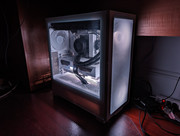
Text form? Why not both!
This is my main rig, custom built earlier this year. Specs are as follows:
CPU: AMD Ryzen 7 9800X3D
GPU: Nvidia GeForce RTX 5080 (replaced an AMD Radeon RX 9070)
RAM: 64GB
Storage: 2TB Samsung PRO 990 SSD + 4TB WD Black HDD
OS: Windows 11 Enterprise
Laptop:
Lenovo ThinkPad T14 AMD Gen 1
CPU: AMD Ryzen 7 PRO 4750U
GPU: Integrated AMD Graphics
RAM: 32GB
Storage: 1TB Samsung SSD
OS: Windows 10 LTSC 2021/Debian 12 (dual boot)
I also have a number of servers, but I'll post two of them here.
File server:
Dell PowerEdge R520
CPU: Intel Xeon E5-2450
RAM: 16GB
Storage: 12TB of RAID volumes
OS: Windows Server 2008 R2 x64
Home web server:
Sun Fire V100
CPU: 500 MHz UltraSPARC IIe
RAM: 2GB
Storage: 128GB SSD (SATA to IDE adapter)
OS: NetBSD 10
_________________
If you like browsing without an ad blocker, you might also like getting rid of your virus scanner, and running around with your pants down. --SomeGuy, 2016
Last edited by nick99nack on Wed Jul 02, 2025 4:41 pm; edited 4 times in total |
|
| Back to top |
|
|
LyraNovaHeart
Gorts
Joined: 15 Apr 2025
Age: 27
Posts: 53
Location: Los Angeles, California
|
| Posted: Wed Jul 02, 2025 4:34 pm Post subject: |
|
|
I'll post mine
Main
Model: Lenovo Legion Pro 7i Gen 9 (83DE)
CPU: Intel Core i9-14900HX, 8P+16E, up to 5.8GHz
GPU: Nvidia Geforce RTX 4090 Mobile 16GB
RAM: 32GB DDR5 5600MT/s SK Hynix
Storage: 1TB Samsung 980 Pro OEM + 2TB Samsung 980 Pro
OS: Windows 11 Enterprise 23H2
Server #1
Model: Dell Insprion 17R 5720
CPU: Intel Core i5-3380M, 2 Cores, 4 Threads, 2.9GHz, up to 3.6GHz boost
GPU: Intel HD Graphics 4000
RAM: 8GB DDR3 1600MT/s NANYA (will upgrade to 16GB)
Storage: 2x 240GB Kingston SV300 SSDs
OS: Windows 10 Pro with ESU, Debian 12, Fedora 42
Server #2
Model: Dell Insprion 560 Tower
CPU: Intel Pentium Dual Core E5700, 2 Core, 3.0GHz
GPU: Intel G43/G45
RAM: 4GB DDR3 1066MT/s
Storage: 1x 1TB WD Caviar Black, 2x Seagate Barracuda 500GB, 1x 1TB WD Green, 1x Unknown 1TB
OS: Windows 7 Pro
Disc Ripping Laptop
Model: HP G71-449WM
CPU: Intel Pentium Dual Core T4300, 2 Core, 2.10GHz
GPU: Intel GMA X4500MHD
RAM: 4GB DDR2 800MT/s
Storage: 1x 240GB Kingston SV300 SSDs
OS: Windows 7 Pro
_________________
I'm one day closer to being who I wanna be~ |
|
| Back to top |
|
|
VCSMaster
Member

Joined: 25 May 2025
Age: 25
Posts: 196
Location: Southeastern USA
|
| Posted: Thu Jul 03, 2025 12:26 am Post subject: |
|
|
I suppose I'll add the "main" hardware I use. A complete list would probably crash the board at this point.
My "main" modern desktop is the following:
Cooler Master N400
ASRock X570 Taichi
AMD Ryzen 5900X
be quiet! Dark Rock Pro 5
128GB DDR4
XFX Speedster SWFT210 (AMD Radeon RX7700XT 12GB)
Dell P2412H
Crucial P3 Plus 4TB
2x WD UltraStar DC HC520 12TB in JBOD
LG WH16NS40
Super Flower Leadex Titanium 1600W
Windows 10 Pro x64
My server is made from used and hand me down parts:
Silverstone Milo ML04B
Biostar B450MH
AMD Ryzen 1700X
whatever cooler I found in my collection that actually fit
32GB DDR4
MSI 1GD3HLP (nVidia GeForce GT710 1GB Low Profile)
random vga monitor
Addlink S70 256GB
2x WD Purple 4TB
Dell PowerVault 132T Ultrium
LSI 20320IE Low Profile
EVGA 450BV
Windows 8.1 Single Language x64
I've got two modern laptops, which I reluctantly use:
GPD Pocket 3
Intel Core i7 1195G7
16GB
Intel Xe
Samsung 980 1TB
Windows 10 Professional x64
HP Victus 16 53G40AV - Special ordered in performance blue!
AMD Ryzen 7 6800H
64GB
nVidia GeForce RTX 3050 Mobile
Anti-glare "300 nits" option LCD
Samsung 980 1TB
Windows 10 Professional x64
These are my most commonly used "retro" machines:
Apple iMac G3 Tray (revision D) "Grape"
PowerPC 750 (g3) @ 333MHz
384MB SODIMM PC100 SDRAM
Quantum Fireball 6GB
ATi Rage Pro Turbo w/ 6MB vRAM
Mac OS 9.2.2
(I am actively looking for a CPU accelerator or upgrades for this machine)
"The bench machine"
Shuttle HOT 661/P
Intel Celeron @ 1400MHz (via PowerLeap PL-iP3/T)
1GB DIMM PC100 SDRAM
ATi Radeon 7500 DDR 32MB (AGP 2x)
Royal Electronics 14" XGA CRT (looking for a nice early LCD to replace this)
ExcelStor Gemini G140 40GB
Toshiba ODD-DVD SD-R5272
Iomega ZIP100
ROMTEC Trios
Dual 3.5" floppy drives
Adaptec AHA-2940AU PCI SCSI controller
DTC 7287 cached RLL controller
Conexant Riptide Chameleon
Motorola BitSURFR ISA
Intel PRO/100+ PCI
Windows XP Professional SP3
Windows Millennium Edition
Dell Precision M20
Intel Pentium M 780
2GB SODIMM DDR
ATi FireGL V3100
1400x1050 panel, which I run at 1024.x768
2x WD Black 100GB
"modern" TP Link 802.11a/b/g/n miniPCI adapter
[/b] |
|
| Back to top |
|
|
VCSMaster
Member
Joined: 25 May 2025
Age: 25
Posts: 196
Location: Southeastern USA
|
| Posted: Thu Jul 03, 2025 12:28 am Post subject: |
|
|
| When I get more desk space in a few weeks/months, I have some other machines to set up, including a 100% fully decked out Dell Dimension 2400 with all the options, a Macintosh Quadra 950 I still want to kit out, and I've been amassing parts for my dream 386 build. Yet to come, though. |
|
| Back to top |
|
|
tommyman24
Banned

Joined: 03 Jul 2025
Posts: 2
|
| Posted: Thu Jul 03, 2025 6:06 am Post subject: |
|
|
| im running an athlon xp 2000+, geforce 2 mx, and 1gb of ddr ram, my other pc is a bit newer with a core 2 duo, 2gb ddr2, and a geforce 7600gt |
|
| Back to top |
|
|
Bryn
Member

Joined: 01 Dec 2024
Posts: 16
Location: Glasgow, Scotland, UK
|
| Posted: Thu Jul 03, 2025 1:26 pm Post subject: |
|
|
The main system I have is a Dell Inspiron N7010, with 4GB memory and 500GB hard drive. I've had it for over thirteen years and everything still runs smoothly, because I've taken good care of it.
My other one is a Lenovo IdeaPad that runs on Windows 10 and has 4GB memory as well, but only 128GB disk space. This was a gift from my brother months ago, and had intended to use it as a work laptop though this hasn't happened yet... but I still use it from time to time though. |
|
| Back to top |
|
|
VCSMaster
Member
Joined: 25 May 2025
Age: 25
Posts: 196
Location: Southeastern USA
|
| Posted: Sun Nov 16, 2025 3:38 am Post subject: |
|
|
| VCSMaster wrote: | | When I get more desk space in a few weeks/months, I have some other machines to set up, including a 100% fully decked out Dell Dimension 2400 with all the options, a Macintosh Quadra 950 I still want to kit out, and I've been amassing parts for my dream 386 build. Yet to come, though. |
Fun fact, the Dimension 2400 I posted about http://www.classicconnect.net/forum/viewtopic.php?t=195 here is exactly what I described in this setup.
Additionally, the "Bench Machine" I mentioned in the earlier post has been upgraded with a GeForce FX5200. Almost no faster than the Radeon 7500, but it does at least have double the VRAM.
I got about half of the 386 machine together, as well. I fully intend to run Windows 95 only on it, which many people like to clown on me for, but I just really don't like Windows 3.x
That and I think the TI 486DLC40 and 32 megs of RAM with proper accelerated 8514 compatible video (via ATi Mach8!) will probably make it just as tolerable as it is on my AST Adventure 466. |
|
| Back to top |
|
|
|
|
You cannot post new topics in this forum
You cannot reply to topics in this forum
You cannot edit your posts in this forum
You cannot delete your posts in this forum
You cannot vote in polls in this forum
|
smartDark Style by Smartor
Powered by phpBB 2.0.25 CC Mod © 2001, 2002 phpBB Group
|