dkay
Member
Joined: 09 Sep 2023
Posts: 11
Location: California
|
 Posted: Sun Sep 10, 2023 3:14 am Post subject: [Guide] Fully Update Windows 7 Posted: Sun Sep 10, 2023 3:14 am Post subject: [Guide] Fully Update Windows 7 |
 |
|
Final Product
(MSE not included but can be installed very easily)
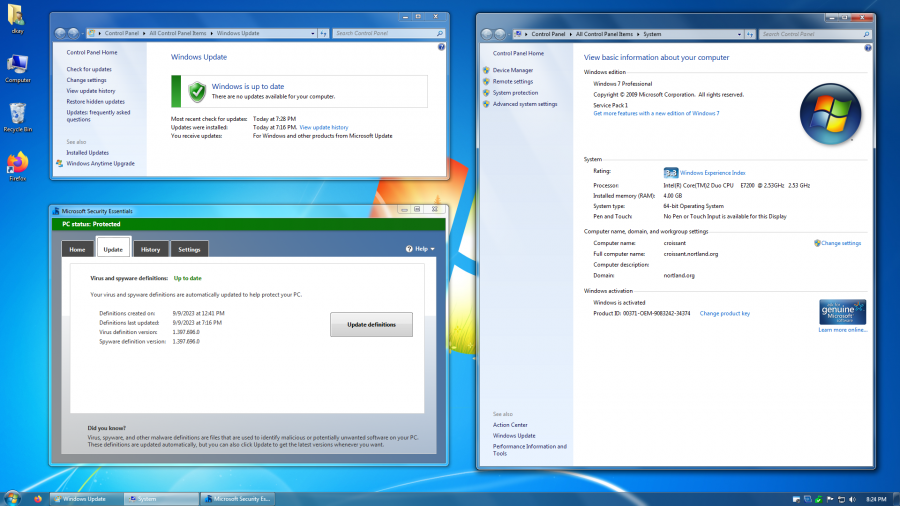
(click image for full resolution)
Preface
Much of this post assumes you are using an MSDN copy of Windows 7 64-bit with SP1. Most things should apply to the later 2018 ISO Microsoft hosted for some time, but no guarantees of everything working as expected.
If you are looking to slipstream drivers into your ISO, I would recommend also slipstreaming the below Certificate Update, but would advise against slipstreaming other updates as I have found this can cause issues with the OOBE.
Root Certificate Updates
After you first install Windows, you will need to install KB3004394-v2 (note that you cannot find this update on Microsoft Update Catalog). This update is needed to do just about anything in the OS. If you don't you will get certificate errors in the browser, Windows online activation won't work, and drivers/software will complain that they are unsigned.
Fixing Windows Update
Next, we will need to get Windows Update working by installing the following updates (in-order):
- KB3138612
- KB3145739
- KB3125574
- KB3125574
- KB4474419
- KB4490628
- KB4531786
 I would advise against installing the updates below as I had them cause issues with DirectX, making the system unusable, but it can save a significant amount of time on the updates later on. I would advise against installing the updates below as I had them cause issues with DirectX, making the system unusable, but it can save a significant amount of time on the updates later on.
- KB3125574
- KB4530734
Updating to 01-2020
Now with Windows Update working, we need to get the system up-to-date up until 01-2020. This is just a matter of checking for updates, doing the ones it finds, restarting, and repeating until it's done. Time consuming but not much you can do to make it faster..
Enabling Microsoft Update
In the meantime you can enable Microsoft Update to get updates for other Microsoft products.
Run the below script as admin, click the "Click here for details" link (you will need to re-open the Windows Update window to see it), then press yes on the popup.
| Code: |
@echo off
echo Set ServiceManager = CreateObject^("Microsoft.Update.ServiceManager"^)>%TEMP%\MSU.vbs
echo ServiceManager.ClientApplicationID = "My App">>%TEMP%\MSU.vbs
echo Set NewUpdateService = ServiceManager.AddService2^("7971f918-a847-4430-9279-4a52d1efe18d",7,""^)>>%TEMP%\MSU.vbs
%windir%\system32\wscript.exe "%TEMP%\MSU.vbs" >nul
|
ESU Prerequisites:
You may already have some of these updates installed. If it says that the update is already installed or you are not applicable you can safely skip the update.
KB4490628
KB4474419
KB5017397
KB4575903
KB5016892
KB3138612
Update to 01-2023 with BypassESU
Now that windows is updated to 01-2020, we can now install ESU updates. To do this we will use BypassESU.
Download BypassESU:
| Code: |
File: BypassESU-v12_u.7z
SHA-1: 90a09ab1b41fac877892da543a775c27661b6058
SHA-256: bc776831237b3aadb601f02d41034019b327e9fbb55a8ce427a3739d26d4440c
7z file password: 2023
https://gitlab.com/stdout12/adns/uploads/530cbef75245d962caede3de62f174a6/BypassESU-v12_u.7z
https://box.com/index.php?rm=box_do...wl444zhvr1ii07dz0w023&file_id=f_1142374963592
https://download.ru/files/IOscQ9yX
|
Extract the zip and run LiveOS-Setup as admin, then select option 1 to install all.
Now go through the same process as above to get your system updated to 01-2023.
Update Until 10-2023
Now that we have completed 01-2023 updates, we will use WU ESU Patcher.
Download:
| Code: |
File: Win7_WU_ESU_Patcher.7z
SHA-1: 056ee61f521faae20a76ef7aa823422b2db1cda6
SHA-256: 7052ffdf6906a9ba5dc4214e35ef96f0261c9ed7797598f938cdc0f88eb8da7c
7z file password: 2023
https://gitlab.com/stdout12/adns/uploads/cd0a6954699d94671142986b48e593ec/Win7_WU_ESU_Patcher.7z
https://box.com/index.php?rm=box_do...wl444zhvr1ii07dz0w023&file_id=f_1154401251478
https://download.ru/files/QBwi2wMz
|
First, uninstall the original WU ESU Patcher by re-running the Live-Setup script and doing option 4.
Now, we can install the post 01-2023 WU ESU Patcher by extracting the above 7z and running WU_ESU_Patcher and pressing 1
Then, you just need to run Windows Update again and get all the latest patches.
Cleaning Up
Once you have all the latest updates, you should re-run the BypassESU LiveOS-Setup script and press 6 to uninstall the .NET patch which can break some MSIs. You will need to re-install this patch every time Windows Update finds a .NET update or it will fail to install.
Tip
The most up to date and supported browser is currently Firefox ESR. You can get the latest version on Ninite at https://ninite.com/firefoxesr/ninite.exe
Last edited by dkay on Sun Sep 10, 2023 3:35 am; edited 1 time in total |
|