|
ClassicConnect
"640k ought to be enough for everybody."
|
| View previous topic :: View next topic |
| Author |
Message |
toxidation
CrossTalk Staff
Joined: 09 Sep 2023
Posts: 29
|
 Posted: Fri Oct 06, 2023 11:59 pm Post subject: [Guide] Fully update Windows 2000 Posted: Fri Oct 06, 2023 11:59 pm Post subject: [Guide] Fully update Windows 2000 |
 |
|
Preface
This is a similar guide to what I posted with Windows XP, albeit probably better written. Oh, and I won't just contribute to ClassicConnect with guides, so stay tuned 
In this guide I will show you how to fully update Windows 2000, install the Extended Kernel, and get some modern browsers on it.
First of all, install Windows 2000, if you haven't already. I don't want to go too in-depth on how to do that, but there are many great guides on how to install Windows 2000 online. There might be a caveat in doing so however that guides may not mention. In the hardware setup phase, I've seen reports that there are IDE driver race conditions and smashing the keyboard and/or moving the mouse might help. Additionally, if you are in need of installation media, go ahead and grab some from WinWorldPC.
Notes about VMware and Update Rollup 1
Afterward, if you're using modern VMware like I am and want to set up VMware Tools, you might want to install Update Rollup 1. Without it, I've seen that the Tools setup fails. If you need a download link to Update Rollup 1 then you can get it from the Microsoft Update Catalog, which Microsoft has thankfully not removed (yet  ) by searching up something along the lines of "Windows 2000 Update Rollup 1". I guess I'll save you the trouble and provide a direct link to the update. ) by searching up something along the lines of "Windows 2000 Update Rollup 1". I guess I'll save you the trouble and provide a direct link to the update.
It might be a little tricky to download Update Rollup 1 and put it into the VM without Tools to have drag-and-drop. For that, you can mount it, use network file sharing (HTTP, FTP, SMB, etc), or create a ISO with the file. I personally create a ISO with CDBurnerXP, but you are welcome to use any other method.
Fully Updating
Now, on to fully updating it. For my VM, I have used LegacyUpdate and it seems to be working well for me, but you may also use the unofficial Windows 2000 Service Pack 5, which can be found on MajorGeeks.
 As pointed out by nick99nack, if you do fully update it via the official updates, which are installed if you use LegacyUpdate, it can cause heating issues on multi-core systems. And additionally, even if you don't have a multi-core system, LegacyUpdate can be very slow with downloading and installing updates. If you have a multi-core system, or are impatient, it might be best to use the Windows 2000 Service Pack 5 anyways. As pointed out by nick99nack, if you do fully update it via the official updates, which are installed if you use LegacyUpdate, it can cause heating issues on multi-core systems. And additionally, even if you don't have a multi-core system, LegacyUpdate can be very slow with downloading and installing updates. If you have a multi-core system, or are impatient, it might be best to use the Windows 2000 Service Pack 5 anyways.
With LegacyUpdate
The LegacyUpdate website can be found here, and press the "Install Legacy Update" button on your old Windows 2000 machine. It should download a setup executable, and you should go ahead and run it and follow through it. Then, after it's done, it should be available in your start menu.
It may require a few updates or two til it gets to the actual updates. Additionally, when updating, don't assume that's all of the updates after installing a batch of updates. It may be helpful to restart and check again.
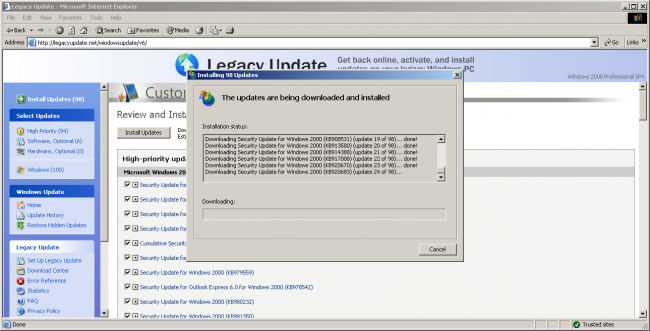
Downloading and installing a batch of updates via LegacyUpdate
Extra: Installing Extended Kernel
This is optional but if you want extended application support, especially for Windows XP applications, I'd recommend to go ahead and get blackwingcat's Extended Kernel. This also enables access to Mypal and 360Chrome, which are useful for modern browsing.
To download it, firstly go here, to the WLU section of win2k.org. If you do not speak Japanese, you should probably click "English" in the navigation bar:

Click "Manual Update" on the sidebar. It will then bring up a search box. Some query like this will work atleast for regular Windows 2000. Here's an example:
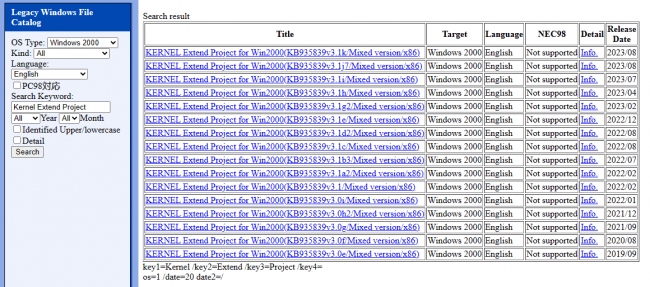
Pick the newest one and download it. It will download a WLU.
...wait, what's a WLU?
It's basically just an archive. Download and install 7-Zip or something similar (I'd recommend 7-Zip) and extract the WLU on the Windows 2000 system. If you're using a VM, you can drag and drop the extracted contents of the archive additionally. Inside of it is a setup.cmd file.
Run that setup.cmd file. I'd also like to note that it's NOT a one-time setup. It will install some prerequisites, then will go on to the actual install. Keep running it until you see the Windows 2000 Power Pack on your start menu.
I'll fill this out when I get around to actually installing Extended Kernel on my VM and have screenshots to show.
Extra: Tweaking the Extended Kernel
TODO
Extra: Using Mypal + 360Chrome with Extended Kernel
TODO
Last edited by toxidation on Thu Oct 26, 2023 9:38 pm; edited 6 times in total |
|
| Back to top |
|
 |
nick99nack
Admin

Joined: 30 Aug 2023
Age: 30
Posts: 187
Location: NJ, USA
|
| Posted: Sat Oct 07, 2023 12:14 am Post subject: |
|
|
Only thing to beware of if you do fully update 2000 is that you will have heating issues on multicore systems. For those, I recommend not fully updating and just using the unofficial SP5 that can be found here: https://www.majorgeeks.com/files/details/microsoft_windows_2000_unofficial_sp.html
Then install extended kernel and whatever as you normally would.
_________________
If you like browsing without an ad blocker, you might also like getting rid of your virus scanner, and running around with your pants down. --SomeGuy, 2016 |
|
| Back to top |
|
|
|
|
You cannot post new topics in this forum
You cannot reply to topics in this forum
You cannot edit your posts in this forum
You cannot delete your posts in this forum
You cannot vote in polls in this forum
|
smartDark Style by Smartor
Powered by phpBB 2.0.25 CC Mod © 2001, 2002 phpBB Group
|