|
ClassicConnect
"640k ought to be enough for everybody."
|
| View previous topic :: View next topic |
| Author |
Message |
LyraNovaHeart
Gorts

Joined: 15 Apr 2025
Age: 27
Posts: 53
Location: Los Angeles, California
|
 Posted: Sat Jun 14, 2025 6:04 am Post subject: CD and DVD-A ripping with Foobar2000 Posted: Sat Jun 14, 2025 6:04 am Post subject: CD and DVD-A ripping with Foobar2000 |
 |
|
Hey there! Have a collection of CDs or DVD-As that you want ripped? You're in the right place then
Pre-Requirements
- A CD Drive and a CD to rip (duh!)
- Foobar2000
Now, onto the Guide
Part 1: CDs (Compact Disc)
CD is relatively easy, as the data itself is just Linear PCM Audio, you can easily copy this (assuming no 2000s era DRM like XCP Copy Protection, Cactus Data Shield, etc). Make sure your disc is inserted, then you can open Foobar2000 to complete the ripping process.
Ripping Steps
- 1. Open Foobar2000 and Navigate to File > Open Audio CD
You should see a Dialogue Box like this, select your CD drive and click Rip.
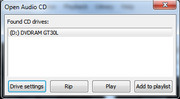
If you do care about accuracy, you can click drive settings and enable ripping security, though disabled is fine as long as the disc is relatively scratch and error free.
- 2 (Optional). Fill out the track and album information at the Rip CD Dialouge Box
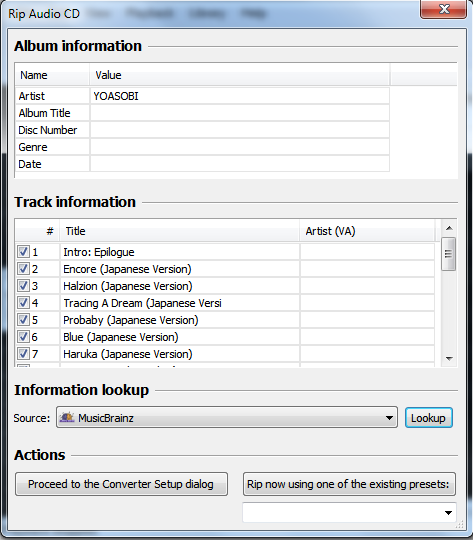
This step is entirely optional, but is recommended. Here you can either fill out the info yourself if it doesn't exist, or if its a well known CD, you can use Musicbrainz's database by the lookup button
- 3. Proceed to Converter Setup.
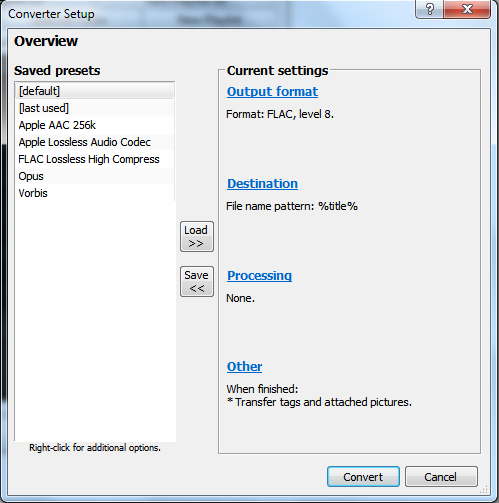
Here is where you'll choose a output format, depending on what you want, you can go for Lossless or Lossy
Lossless formats:
- WAV
- FLAC (needs Foobar2000 Free Encoder Pack or FLAC exe)
- Apple Lossless (needs qAAC + iTunes)
- AIFF
- Wav64
- Wavpack
Lossy Formats (Recommended):
- AAC (Apple) (needs qAAC + iTunes)
- Opus (needs Foobar2000 Free Encoder Pack or OpusTools)
- OGG Vorbis
It is recommended to save to a lossless format first, then convert to lossy if you are going to use lossy.
Note: for HDCD discs, you will need to decode them first, luckily Foobar2000 can handle this, to decode HDCD click Processing and enable "Enable Decode Postprocessing - for DTS, HDCD, etc).
4. Select an output directly and press select folder, your CD will then begin to rip.
5. Done! If you need to convert to lossy just use the same converter by right clicking the track in Foobar2000 and click the dots, then specify format and folder.
Part 2: DVD-A Ripping
DVD-A is a bit more complicated, as it does use DRM (Digital Rights Management) to try and stop copying, for this you'll need a separate component.
Requirements
- DVD-A and DVD Drive (again, duh!)
- Foobar2000
- Foobar2000 DVD-Audio Decoder, https://sourceforge.net/projects/dvdadecoder/ to install go to File > Preferences > Components > Install and select the file, then restart
Ripping Steps
1. Go to File > Add Folder > Point to the DVD-A disc, or if ISO, just import directly
2. Determine which you want, as they have 5.1 and 2.0 tracks
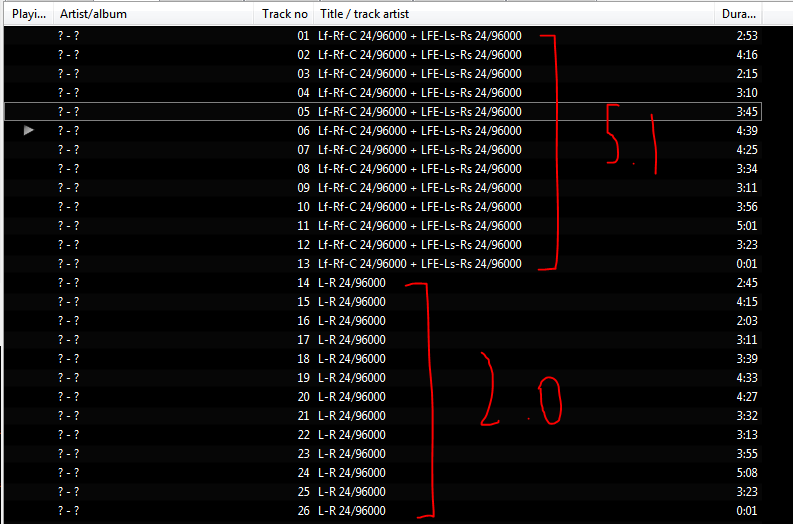
3. Select the songs you want and right click, then convert, and select your desired format
4. Select the directory and let it copy the tracks
5. Done!
_________________
I'm one day closer to being who I wanna be~
Last edited by LyraNovaHeart on Thu Jul 24, 2025 12:11 am; edited 1 time in total |
|
| Back to top |
|
 |
Bryn
Member

Joined: 01 Dec 2024
Posts: 16
Location: Glasgow, Scotland, UK
|
| Posted: Sat Jun 14, 2025 10:11 am Post subject: |
|
|
Just to say, VLC Media Player can allow you to rip DVD content also, although a bit more complicated... didn't know that Foobar can do this as well so I'll keep that in mind next time  |
|
| Back to top |
|
|
LyraNovaHeart
Gorts
Joined: 15 Apr 2025
Age: 27
Posts: 53
Location: Los Angeles, California
|
| Posted: Sat Jun 14, 2025 3:47 pm Post subject: |
|
|
DVD-A doesn't equal DVD-Video.
VLC can rip DVD-Video due to CSS (Content Scrambling System) being broken many years ago. DVD-A uses CPPM (Content Protection for Recordable Media), which is an entirely different DRM standard that VLC can't handle. It might be able to rip the DVD-Video portion but the actual MLP Lossless audio remains protected unless ripped with Foobar2000.
_________________
I'm one day closer to being who I wanna be~ |
|
| Back to top |
|
|
nick99nack
Admin
Joined: 30 Aug 2023
Age: 30
Posts: 187
Location: NJ, USA
|
| Posted: Sat Jun 14, 2025 3:56 pm Post subject: |
|
|
I have actually never tried foobar2000 for ripping DVD-A. I used to use a totally legit copy of DVD Audio Extractor which worked pretty well, but this seems a lot better honestly. I'm going to have to try this.
_________________
If you like browsing without an ad blocker, you might also like getting rid of your virus scanner, and running around with your pants down. --SomeGuy, 2016 |
|
| Back to top |
|
|
|
|
You cannot post new topics in this forum
You cannot reply to topics in this forum
You cannot edit your posts in this forum
You cannot delete your posts in this forum
You cannot vote in polls in this forum
|
smartDark Style by Smartor
Powered by phpBB 2.0.25 CC Mod © 2001, 2002 phpBB Group
|