|
ClassicConnect
"640k ought to be enough for everybody."
|
| View previous topic :: View next topic |
| Author |
Message |
europa
Gorts

Joined: 16 Aug 2025
Age: 23
Posts: 70
Location: 8:0:20:c0:ff:ee
|
 Posted: Wed Apr 08, 2026 8:22 pm Post subject: Compaq SLT/286 Restoration Posted: Wed Apr 08, 2026 8:22 pm Post subject: Compaq SLT/286 Restoration |
 |
|
I recently came across a Compaq SLT/286 in somewhat decent condition. It was missing the power adapter and battery, and the rear panel has fallen off, but that's nothing that I cannot fix. I wanted to post a thread about getting it back up and running, and restoring it where I can.
For some background, the Compaq SLT/286 was released in 1988 and shipped with a 12MHz 286 processor. It came with 640kB of memory (which is expandable to 12.6MB from what I'm reading), a 20 or 40MB hard drive, a high-density 3.5" diskette drive, a monochrome VGA screen with VGA output, an optional 2400 baud modem that mine does have, and a battery that was advertised to be at least three hours. Additionally, it has a PS/2 keyboard port (not mouse), serial port, parallel port, what seemingly looks to be some manner of proprietary floppy or tape drive port, and an expansion connector that can hook up to a docking station that provides two ISA slots.
The largest priorities for this machine are to back up the hard drive if possible, replace the CMOS battery and clock chip, as it's something like a Dallas chip, and create a power adapter that will work with the unit. I would also like to reattach the rear panel and perhaps find a way to fill the hole in the case where the battery went (or even build a new battery for it), but those are both largely cosmetic issues and don't affect the operation of the unit overall.
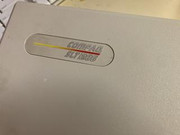 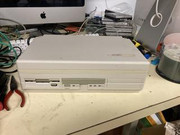
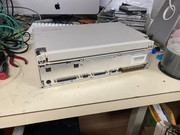 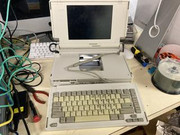
Case badge, front, and rear of the laptop, and the laptop fully opened.
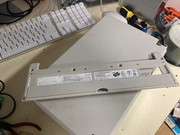 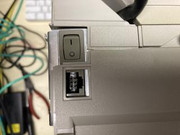
The detached back panel and power adapter port.
I look forward to restoring this machine, it's my first 286 machine I've ever owned and it's absolutely beautiful.
_________________
Your System ate a SPARC! Gah! |
|
| Back to top |
|
 |
nick99nack
Admin

Joined: 30 Aug 2023
Age: 30
Posts: 182
Location: NJ, USA
|
| Posted: Wed Apr 08, 2026 9:02 pm Post subject: |
|
|
That is a beautiful machine. Looking forward to hopefully seeing it up and running!
_________________
If you like browsing without an ad blocker, you might also like getting rid of your virus scanner, and running around with your pants down. --SomeGuy, 2016 |
|
| Back to top |
|
|
europa
Gorts
Joined: 16 Aug 2025
Age: 23
Posts: 70
Location: 8:0:20:c0:ff:ee
|
| Posted: Sun Apr 12, 2026 3:24 am Post subject: |
|
|
Yes! I'm excited to get it working. Also I think this will be my third hostnameless machine, aside from my Kaypro and my VIC-20, at least unless I network it in some way that requires that it inform a network of a human-readable name.
_________________
Your System ate a SPARC! Gah! |
|
| Back to top |
|
|
parasquared
WebTV

Joined: 15 Dec 2025
Posts: 44
Location: Portland, OR
|
| Posted: Mon Apr 13, 2026 3:30 am Post subject: |
|
|
do the other two at least have names? or are they completely nameless 
_________________
- parasquared
"In space there is no center, we're always off to the side"
- Ballad of Reverend War Character, Silver Jews |
|
| Back to top |
|
|
europa
Gorts
Joined: 16 Aug 2025
Age: 23
Posts: 70
Location: 8:0:20:c0:ff:ee
|
| Posted: Mon Apr 13, 2026 4:36 am Post subject: |
|
|
I mostly just refer to them by their model name, mostly because the names are only really there to help me identify them on a network. That being said, it might be fun to come up with names for them
_________________
Your System ate a SPARC! Gah! |
|
| Back to top |
|
|
VCSMaster
Member

Joined: 25 May 2025
Age: 25
Posts: 162
Location: Southeastern USA
|
| Posted: Fri May 08, 2026 3:14 am Post subject: |
|
|
| Wow, I know someone who needs to see this. Maybe this will convince him to join! |
|
| Back to top |
|
|
80compaqpc
New Member
Joined: 09 May 2026
Posts: 1
|
| Posted: Sat May 09, 2026 5:13 am Post subject: |
|
|
| VCSMaster wrote: | | Wow, I know someone who needs to see this. Maybe this will convince him to join! |
Here I am! Thanks for showing me this!
Excellent find! These are some of my absolute favorite laptops ever. Such a well designed machine with a great form factor. Very durable and reliable machines too. And it was Compaq's first laptop and the first ever laptop to have VGA graphics!
For reattaching the back panel, I recommend removing the motherboard first, because I've seen cases where the tabs on the bottom dig into the motherboard and damage traces when reinstalling it. Many people think you have to take the back panel off before sliding the chassis out, but you do NOT and the service manual never says to do to.
These are not terribly hard machines to work on at all, in fact they are quite easy compared to many other laptops of the era. Compaq's engineering was just amazing in this era.
Here is a link to the official service manual:
https://www.minuszerodegrees.net/manuals/Compaq/Compaq%20SLT286%20and%20SLT386s20%20-%20Maintenance%20and%20Service%20Guide.pdf
As you mentioned, these machines do use a Dallas chip, which is NOT socketed which can make things tricky, but I actually cut into them to expose the battery contacts with a Dremel while still on the board, as they are kind of a pain to desolder since the pics are so tiny. I do NOT recommend that unless you have a steady hand though, as one slip can severely damage the board.
There was someone selling a modern power supply solution on eBay recently, but I'm not sure if they still are or not. The original power supplies can be tricky to find on their own. I have bought entire machines just to get a power adapter before!
For the hard drive, if it's original, it will be a Conner CP-3021, 3021i (20MB) or a CP-3041 (40MB). You have to be careful with these because the gasket/seal melts and can get all over the inside of the drive. If it gets all over the platters then the drive is pretty much toast, but if not, you can clean the mess up, and reseal the drive with silicone. I have many of these I've repaired still going strong. You do have to remove the lid to inspect and clean the drive, but it will not hurt it if you are careful. You also have to inspect the rubber bump stops for the head actuator (located on either side of the magnet) as they will likely have melted too. I just clean these up and leave them off, as these drives don't actually need the bumpers like some others.
Another word of caution for these hard drives, is the foam insulation degrades between the PCB and drive chassis, and in some cases I have had this short out and destroy the PCB, so I also recommend removing the PCB, scraping off the degraded foam and replacing it with some very thin cardboard. All of this should be done BEFORE attempting to power up the drive! This all comes from research and my own experience with these drives over the years. I've had pretty decent luck reviving them and keeping them going with these methods. Many people replace these with modern solid state solutions, but I like my spinning rust personally.
Hope this is of some help! Wish you luck on getting your SLT running! |
|
| Back to top |
|
|
|
|
You cannot post new topics in this forum
You cannot reply to topics in this forum
You cannot edit your posts in this forum
You cannot delete your posts in this forum
You cannot vote in polls in this forum
|
smartDark Style by Smartor
Powered by phpBB 2.0.25 CC Mod © 2001, 2002 phpBB Group
|